Every Major Tech Update Creates One Business Question: What Should Change Now?
Major technology updates rarely arrive as isolated technical events. An algorithm change, AI search rollout, browser rendering update, or new platform capability can alter how customers discover companies, evaluate products, interact with websites, and make purchasing decisions.
For technology leaders, the difficult question is not whether an update matters. The difficult question is what should change now.
A platform announcement can affect search visibility without requiring a redesign. A new AI discovery layer can expose weaknesses in content architecture without immediately reducing traffic. A browser change can create technical problems that users notice long before internal analytics identify them.
This creates a strategic challenge. Businesses need to distinguish between changes that require immediate action, changes that require monitoring, and changes that should influence the next planning cycle.
The strongest response is therefore not reaction. It is structured evaluation across brand positioning, digital architecture, search visibility, user experience, and commercial performance.
The Strategic Fall-Out of Constant Platform Volatility
Digital platforms are becoming increasingly dynamic. Search engines are incorporating generative interfaces, AI assistants are becoming discovery channels, browsers are evolving how pages are rendered, and users are changing how they research products and services.
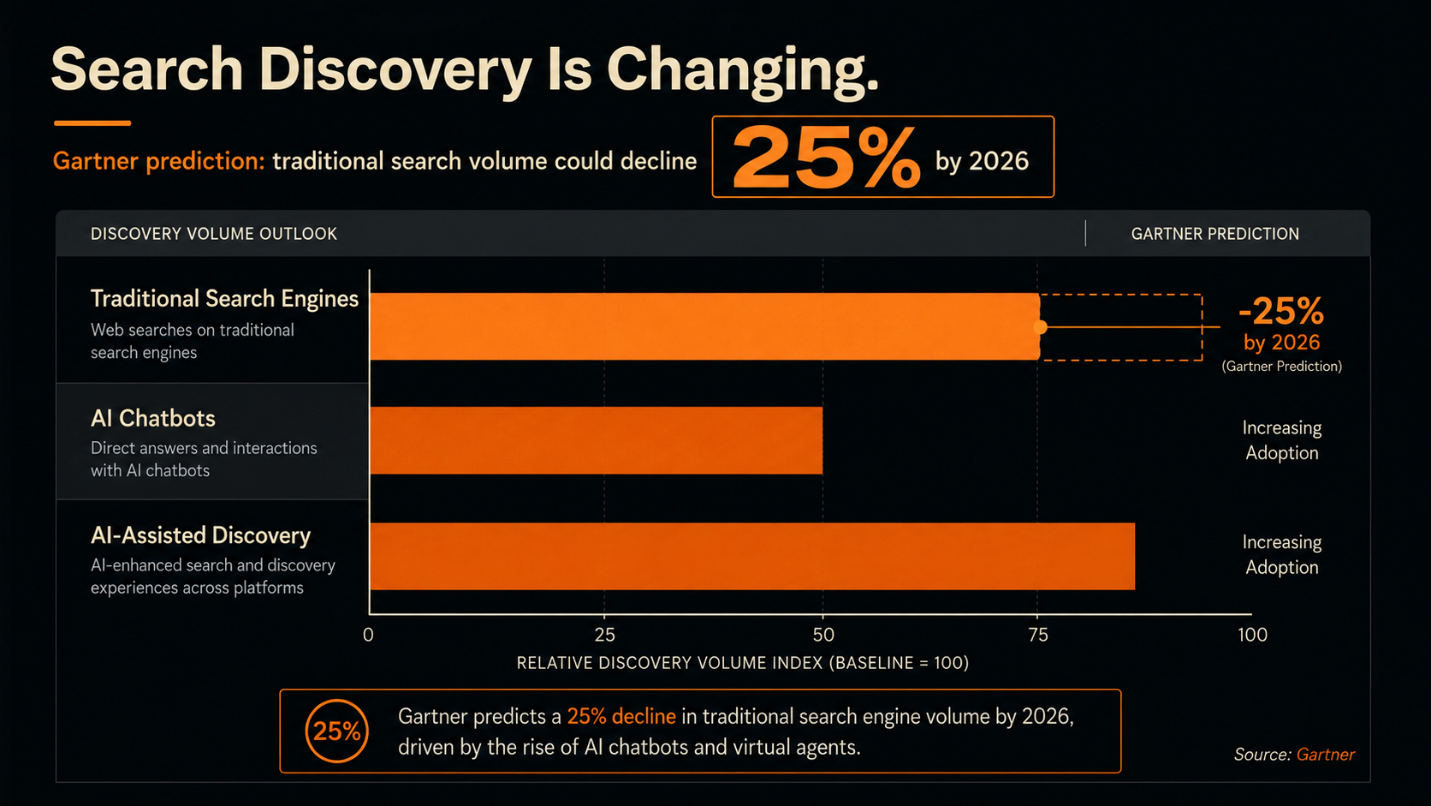
Gartner predicted that traditional search engine volume would decline by 25% by 2026 as users increasingly rely on AI chatbots and virtual agents. Its later research also emphasizes that traditional search remains important, meaning businesses need strategies that address both conventional search and AI-driven discovery. (Source: Gartner)
The business risk is not simply losing rankings. It is losing visibility at a particular stage of the customer journey while assuming that historical performance will continue.
A company can maintain strong organic rankings and still experience changes in click behavior, query composition, referral patterns, and conversion paths. Conversely, a temporary traffic decline may not justify a complete SEO or website overhaul if commercial outcomes remain stable.
This is why technology updates should trigger a business assessment rather than an automatic implementation project. Leaders need to understand what changed, which business metric is exposed, and whether the current architecture can adapt without unnecessary disruption.
The organizations that respond effectively treat platform volatility as an ongoing strategic variable. They monitor discovery behavior, customer intent, technical performance, brand visibility, and conversion quality together.
Why Modern Tech Companies Must Re-evaluate Their Brand Positioning
Brand positioning can become outdated even when a company’s visual identity remains recognizable.
Technology markets change rapidly. New competitors enter established categories, product capabilities converge, buyer expectations evolve, and technical language becomes increasingly important to purchase decisions. A message developed several years ago may no longer communicate the company’s current value, expertise, or market relevance.
This is where a specialized Branding Agency For Tech Companies can contribute at a strategic level. The objective is not simply to redesign a logo or introduce a new visual system. It is to examine whether the company’s positioning still connects its capabilities with the problems its market is actively trying to solve.
Technology brands also face a translation problem. Technical teams may describe architecture, integrations, security, infrastructure, or product capabilities accurately, while buyers evaluate business risk, operational outcomes, usability, and commercial impact.
A strong positioning system connects these perspectives without diluting technical credibility.
Major technology updates provide a useful trigger for this review. If a new search environment changes how customers discover information, the business should ask whether its core messages are still discoverable, understandable, and differentiated across those environments.
Brand strategy therefore needs to account for both human interpretation and machine-mediated discovery.
Re-aligning Digital Architecture: The Intersection of Branding And Website Design
A website is simultaneously a brand environment, information system, conversion interface, and machine-readable source of business information.
When technology platforms change, these functions can become misaligned. A visually polished website may communicate the brand effectively to a human visitor while presenting weak information architecture to search systems. Conversely, technically optimized pages can perform efficiently while creating an inconsistent or confusing brand experience.
This is why Branding And Website Design should be evaluated as connected disciplines rather than separate projects.
Navigation, page hierarchy, terminology, content structure, visual hierarchy, internal linking, accessibility, and technical markup all influence how users and systems interpret a company.
Google states that structured data helps its systems understand page content and can support eligibility for certain search features. This reinforces the role of information architecture alongside visual and content decisions. (Source: Google Search Central)
The practical implication is significant. A website redesign should not begin with visual preferences alone. Leaders should first identify which business information must remain prominent, which customer journeys require improvement, which technical constraints are limiting performance, and which content needs stronger semantic organization.
Brand consistency and technical clarity should reinforce each other. When the website communicates the same positioning through its copy, architecture, visual system, metadata, and user journeys, the business creates a stronger foundation for both discovery and conversion.
Adapting SEO Optimization Services to the New Search Reality
Traditional SEO remains important, but platform changes are altering what optimization needs to accomplish.
Keyword targeting, title optimization, backlinks, and technical health still matter. However, search environments increasingly evaluate information through entities, relationships, context, structured information, and broader topical authority.
Modern SEO Optimization Services therefore need to move beyond isolated keyword targets. A technology company should be able to establish who it is, what it offers, which industries it serves, which problems it solves, and how its expertise connects across its digital ecosystem.
Entity-oriented optimization becomes particularly important when search systems and AI interfaces construct answers from multiple sources. Content should provide clear relationships between products, services, people, organizations, technologies, industries, and use cases.
Structured data can support this process, while internal linking and consistent terminology help reinforce relationships across the site. Google also continues to document search appearance features and structured data as mechanisms that help its systems understand website content. (Source: Google Search Central)
Zero-click content also requires strategic consideration. If a user receives enough information directly within a search interface, the business may gain visibility without receiving an immediate website visit.
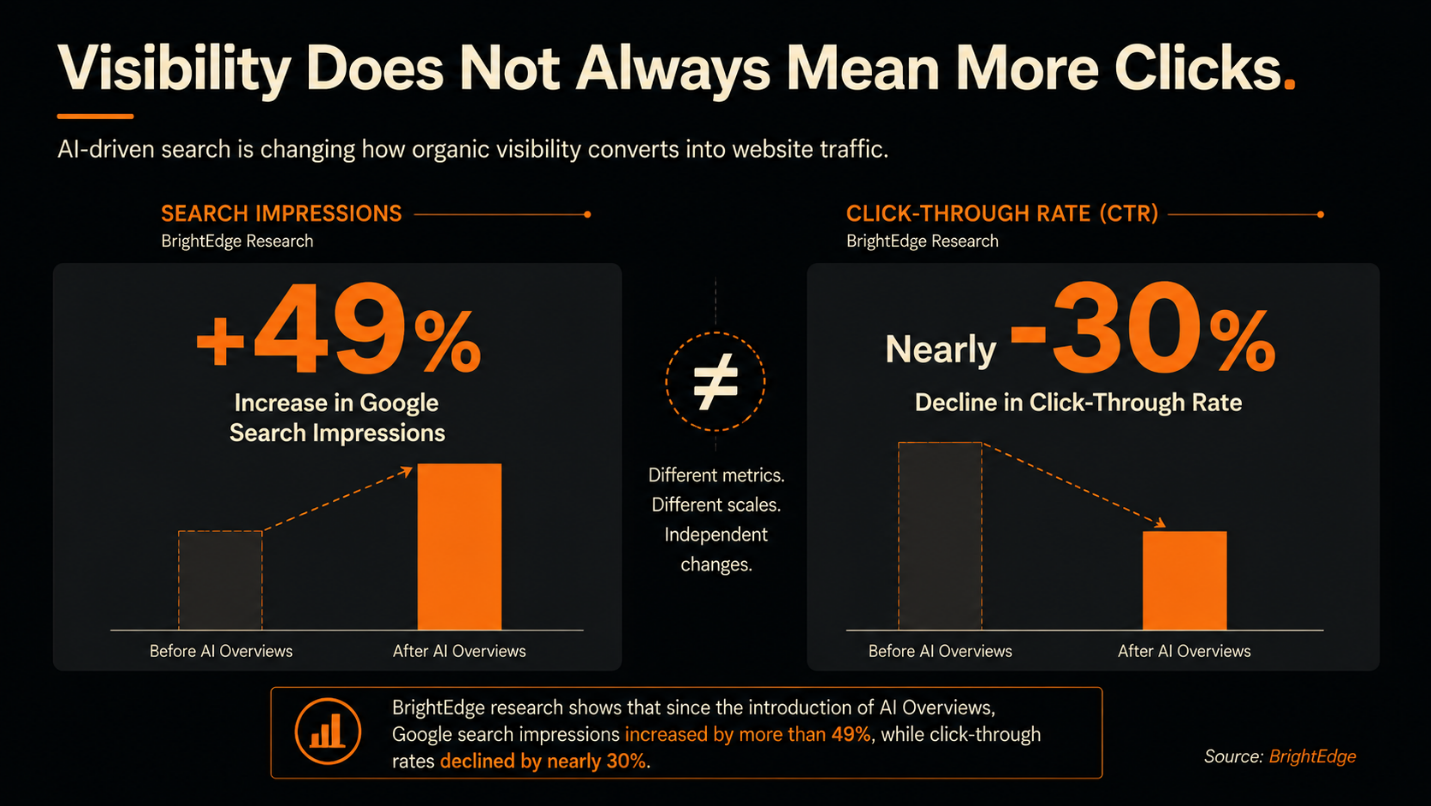
BrightEdge reported that Google search impressions increased by more than 49% following the introduction of AI Overviews, while click-through rates declined by nearly 30%. This illustrates why visibility and traffic can no longer be treated as interchangeable measures of search performance. (Source: BrightEdge)
The objective is therefore broader: establish authority, become discoverable across emerging interfaces, and ensure that the website remains the authoritative destination when deeper evaluation or conversion requires a direct visit.
The Audit Framework: Determining What Changes First
Executives should resist the temptation to redesign everything after every major platform update. A structured audit can identify the highest-value intervention.
1. Start with commercial impact
Determine whether the update affects revenue, qualified leads, conversion rates, customer acquisition cost, or strategic accounts. A ranking fluctuation without commercial impact may require monitoring rather than immediate restructuring.
2. Evaluate discovery
Review organic visibility, branded search, non-branded queries, AI citations where measurable, referral sources, and changes in customer research behavior. The question is whether the market can still find and understand the company.
3. Audit the message
If customers are discovering the company but failing to understand its value, positioning and content should receive attention before technical redevelopment.
4. Audit the website architecture
Look at navigation, page relationships, technical accessibility, structured data, internal linking, performance, mobile behavior, and content hierarchy. Structural weaknesses should take priority when they prevent users or search systems from accessing important information.
5. Review the visual and brand system
A visual redesign should follow evidence. If the identity no longer represents the company’s market position, product maturity, or strategic direction, branding should move higher on the priority list.
6. Establish a measurement layer
Define the metrics that will determine whether the intervention worked. Gartner has advised marketers to move beyond traffic alone and evaluate search performance through business outcomes and a combination of visibility and performance indicators. (Source: Gartner)
This framework creates sequencing discipline. Content should change first when information is weak. Brand positioning should move first when market perception is misaligned. Technical architecture should take priority when the website cannot reliably communicate or deliver the experience the business requires.
Audit Your Technical and Brand Infrastructure Today
Technology updates should not dictate strategy. They should expose where strategy, infrastructure, brand communication, and customer discovery require reassessment.
The relevant question for an executive team is not simply, “What did Google, a browser, or an AI platform change?”
The stronger question is, “Which part of our digital business is now exposed, and what evidence tells us what to change?”
That distinction prevents expensive reactive work. It also creates a disciplined way to decide when a content program, brand repositioning, website redesign, or technical intervention is commercially justified.
Review your brand positioning, website architecture, search visibility, technical foundations, and customer journey against the platforms your market now uses to discover and evaluate businesses.
The next major update will arrive regardless of whether the organization is prepared for it. The strategic advantage comes from knowing which systems can absorb change, which require intervention, and which should remain untouched.
Technology changes quickly, but your digital infrastructure should not be reacting blindly to every update.
If your brand positioning, website architecture, or search strategy has not been reviewed against the current digital environment, now is the right time to assess it.
Review what needs to change, what needs to improve, and what should remain untouched.
Contact us to discuss your digital infrastructure and identify the priorities that matter for your business. Let’s turn those priorities into a clear digital action plan.